
Holding a video visit
Open a video session, check your camera and microphone, let the client in, and leave or end the visit.
Who this is for: Clinician, Associate clinician, Scheduler, Practice manager, Practice administrator
A session booked by video opens shortly before its start time. The client joins from their portal or from a link, waits, and is let in once you are in the call.
Check your devices and join
- On Schedule, select the video session, then Open the visit.
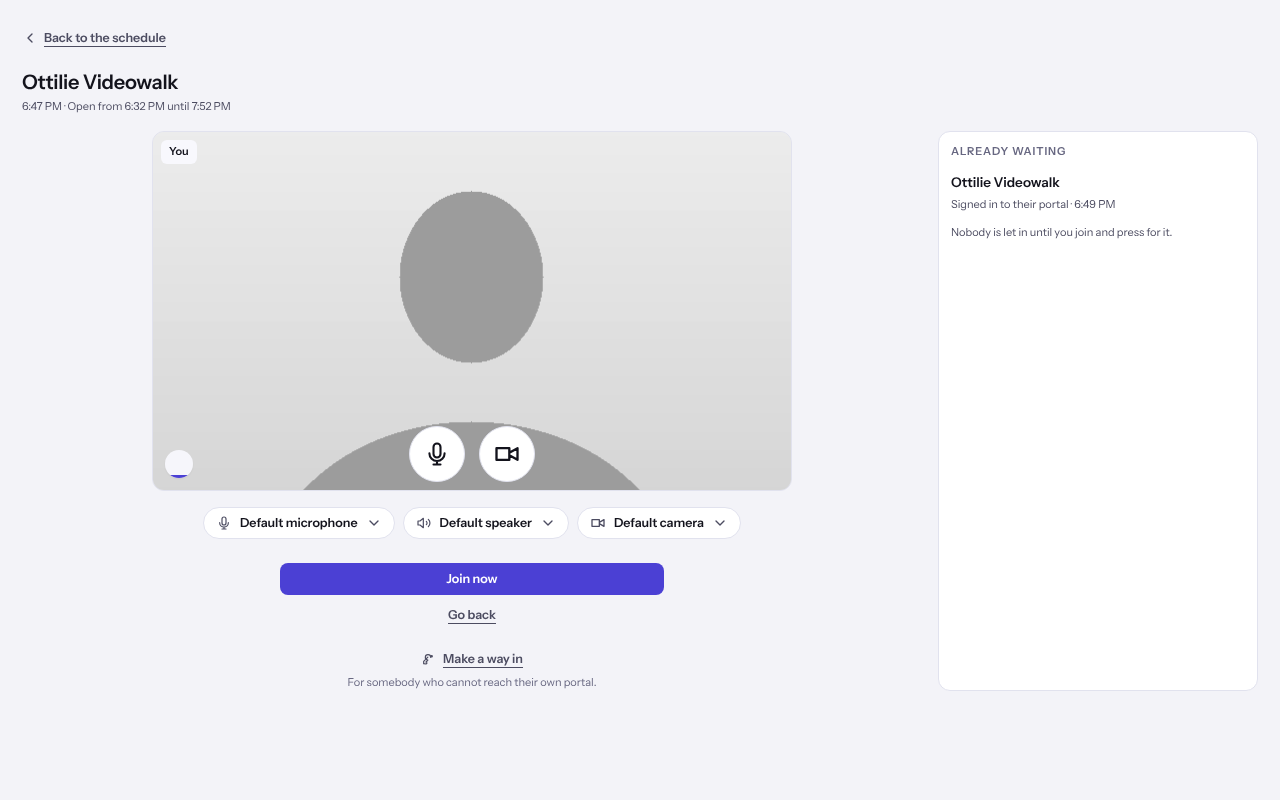
- Check your picture, and choose a Camera and Microphone if the default is not the one you want.
- Anybody listed under Already waiting has arrived. Select Join now.
Tip: If your camera or microphone will not open, Weft says why and offers Join without a camera or Join without a microphone. Tell the client at the start so they are not left waiting for a face.
Let the client in
- Beside the call, open Waiting and select Let in beside the client's name.
- They join as soon as their own page connects. A badge on an arrival tells you if they came in on a forwarded link rather than their own portal.
Work beside the call
- Open Chart to read the client's details while you talk.
- Open Notes to start or carry on the session's note, and sign it there when it is done.
- Open Messages to write to the client in the conversation the inbox already holds.
Leave, or end the visit
- To step out and come back, select Leave the visit, then Leave, keep it open. The visit stays open for everybody else.
- To finish the session, open Visit and select End the visit for everybody, then End it for everybody. Everybody is disconnected and the room closes.
Last checked against Weft on 07 Oct 2026. Something on your screen reads differently? Tell us at support@weftary.com.
Common questions
The visit says it is over but we still need to talk. Can I reopen it?
On a session booked for today, select Open it again, say Why are you opening it again? and confirm. The booking's own times do not move.
Is the call encrypted?
A padlock beside the call shows whether the media is end to end encrypted. Both you and the client are told when it is not.