
Answering a card dispute
Read a client's dispute of a card payment and send the payment processor your answer before the deadline.
Who this is for: Biller, Practice manager, Practice administrator
A dispute is a client's challenge to a card payment with their bank. The money is with the bank while it is decided, and the payment itself is unchanged.
Open the dispute
- Select Payments and find Disputes. Answer by shows how many days are left.
- Select the dispute to open it. The disputed charge shows the receipt and the invoice it was against.
Prepare and send your answer
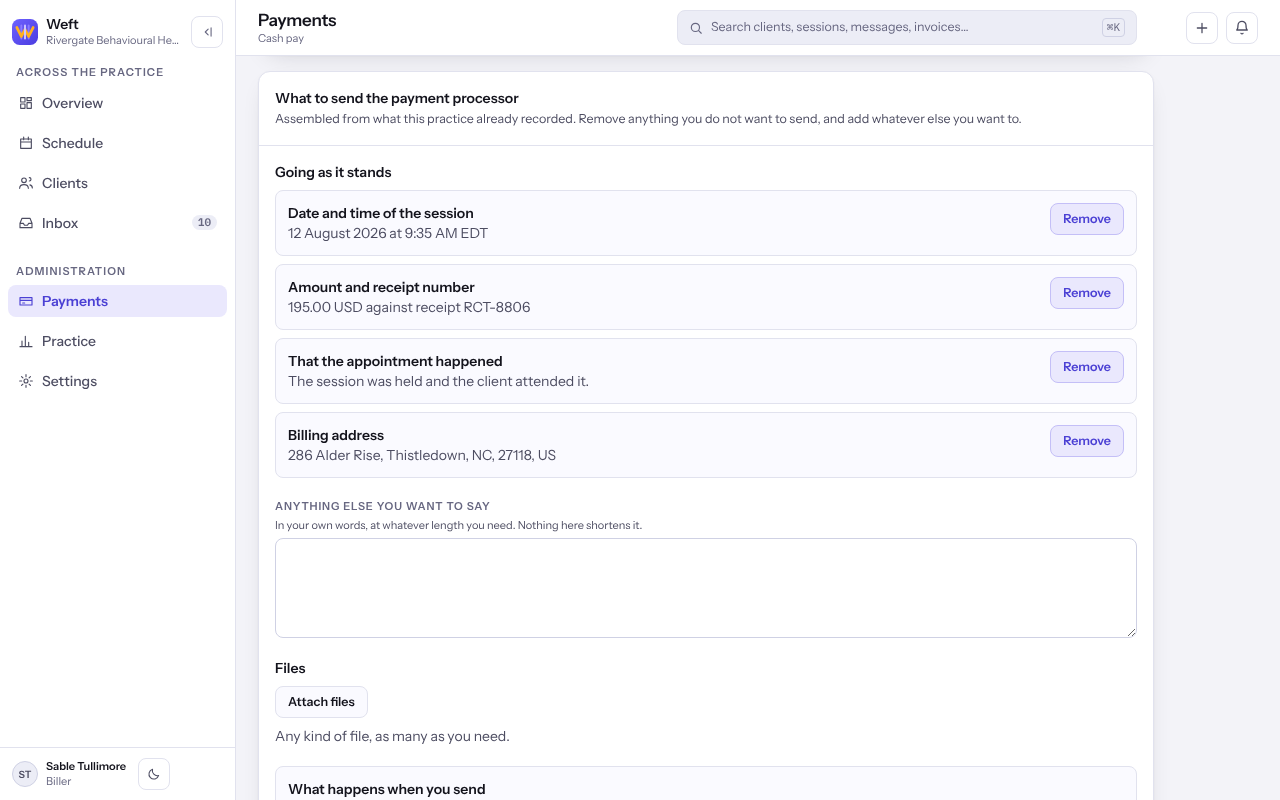
- Under What to send the payment processor, read the fields assembled from what your practice recorded. Select Remove on anything you do not want to send, and Put back to change your mind.
- Add Anything else you want to say, and select Attach files for receipts or records.
- Read What happens when you send, then select Send to the payment processor.
Important: What you send cannot be recalled, and the processor accepts nothing after the answer-by date.
Note: Weft keeps a record that the answer left, when and which fields went, and not a copy of what it said.
Last checked against Weft on 07 Oct 2026. Something on your screen reads differently? Tell us at support@weftary.com.