
Issuing a statement or a superbill
Assemble a statement of what a client owes, or a superbill they can hand to their health plan, over a period.
Who this is for: Biller, Practice manager, Practice administrator
A statement says what a client owes your practice. A superbill is an itemised receipt they hand to their health plan.
Assemble the draft
- On Payments, select Statements & superbills, then New document.
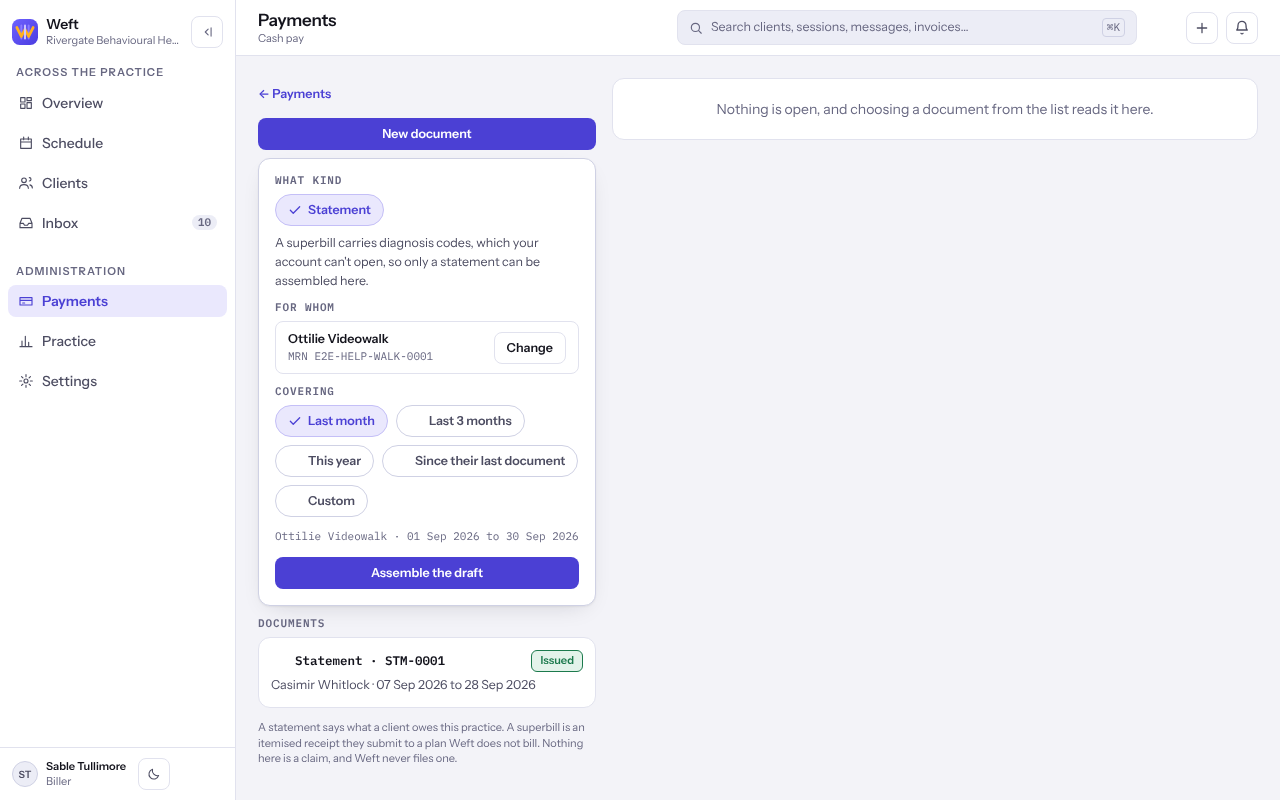
- Under What kind, choose a statement or a superbill, and under For whom, choose the client.
- Under Covering, choose Last month, Last 3 months, This year, Since their last document or Custom with a From and To.
- Select Assemble the draft. Weft builds it from the sessions, codes and payments already recorded in that period.
Check it and issue it
- Read the draft. Anything still missing is listed, and issuing waits until it is resolved.
- Select the button that reads Issue this followed by the kind of document. The figures, codes and practice details are fixed as they stand.
- Print it or save it as a PDF and give it to the client. A client with portal access can also read it there.
Note: Weft sends nothing when you issue. To put an issued document right, select Correct this document…, which starts a new one that replaces it.
Last checked against Weft on 07 Oct 2026. Something on your screen reads differently? Tell us at support@weftary.com.