
Recording a diagnosis
Add a coded diagnosis to a client's problem list, date it, and mark it resolved.
Who this is for: Clinician, Associate clinician, Practice administrator
Record it
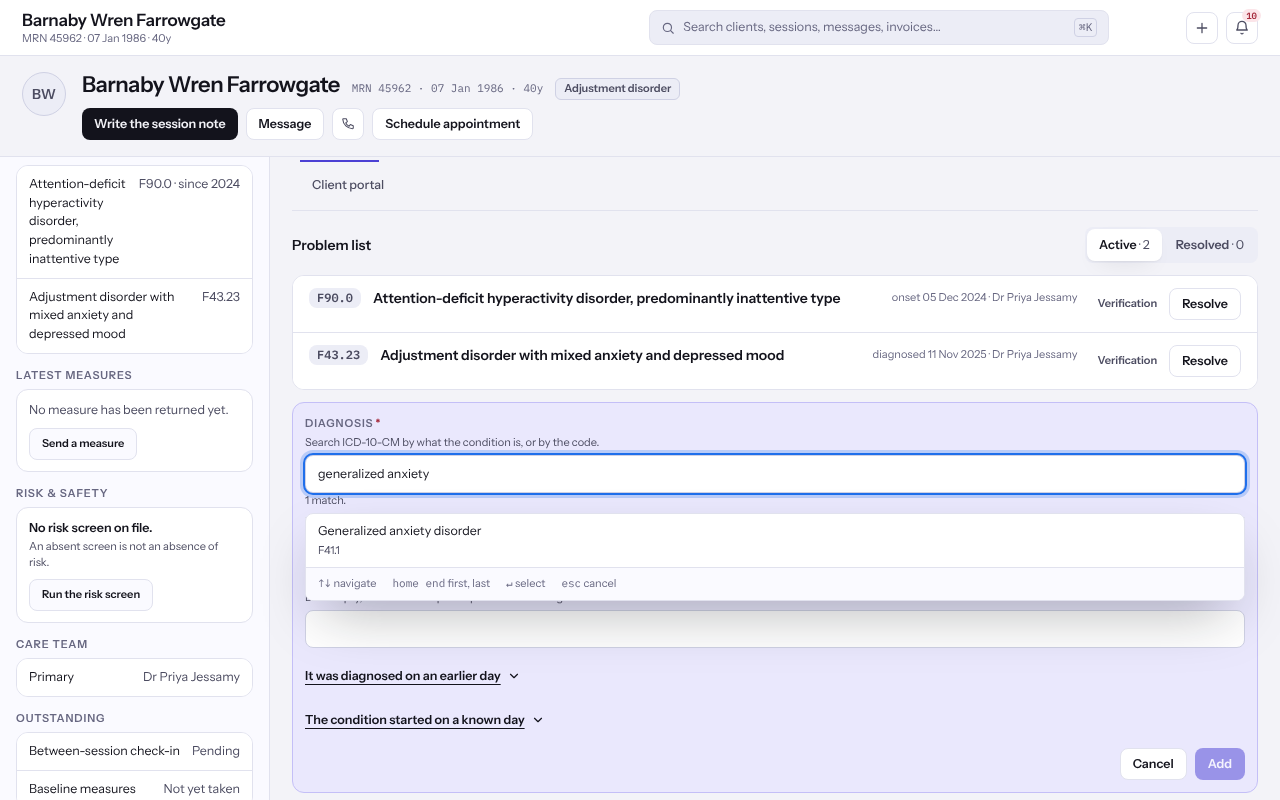
- Open the client. On Overview, find Problem list.
- Select + Diagnosis.
- Under Diagnosis, search ICD-10-CM by what the condition is or by the code, and choose one.
- Optionally write it In the practice's own words. Left empty, the published wording is kept.
- If it was diagnosed before today, open It was diagnosed on an earlier day and give Diagnosed on. If you know when it began, open The condition started on a known day and give Onset.
- Select Add.
Note: Every code is recorded with its code system and release, and shown with them wherever it appears.
Mark it resolved
- Beside the diagnosis, select Resolve.
- Give Resolved on, or say why the day is not known.
- Select Mark it resolved. It moves to Resolved.
Last checked against Weft on 07 Oct 2026. Something on your screen reads differently? Tell us at support@weftary.com.