
Booking a standing arrangement
Book a run of sessions on a weekly pattern, change the pattern later, or stop it.
Who this is for: Clinician, Associate clinician, Scheduler, Practice manager, Practice administrator
Book the run
- Start a booking as in Booking a session and pick the time of the first session.
- Under Once, or a run, choose It repeats and select Next.
- Under How far apart, choose Every week, Every 2 weeks or Every 4 weeks, and check the days under Which days.
- Under When it stops, choose A set number of dates, Up to a date or No end, and fill in the number or date.
- Select Next, check the summary, and select Book. The answer lists the sessions booked and any date the diary could not take; select Done to close it.
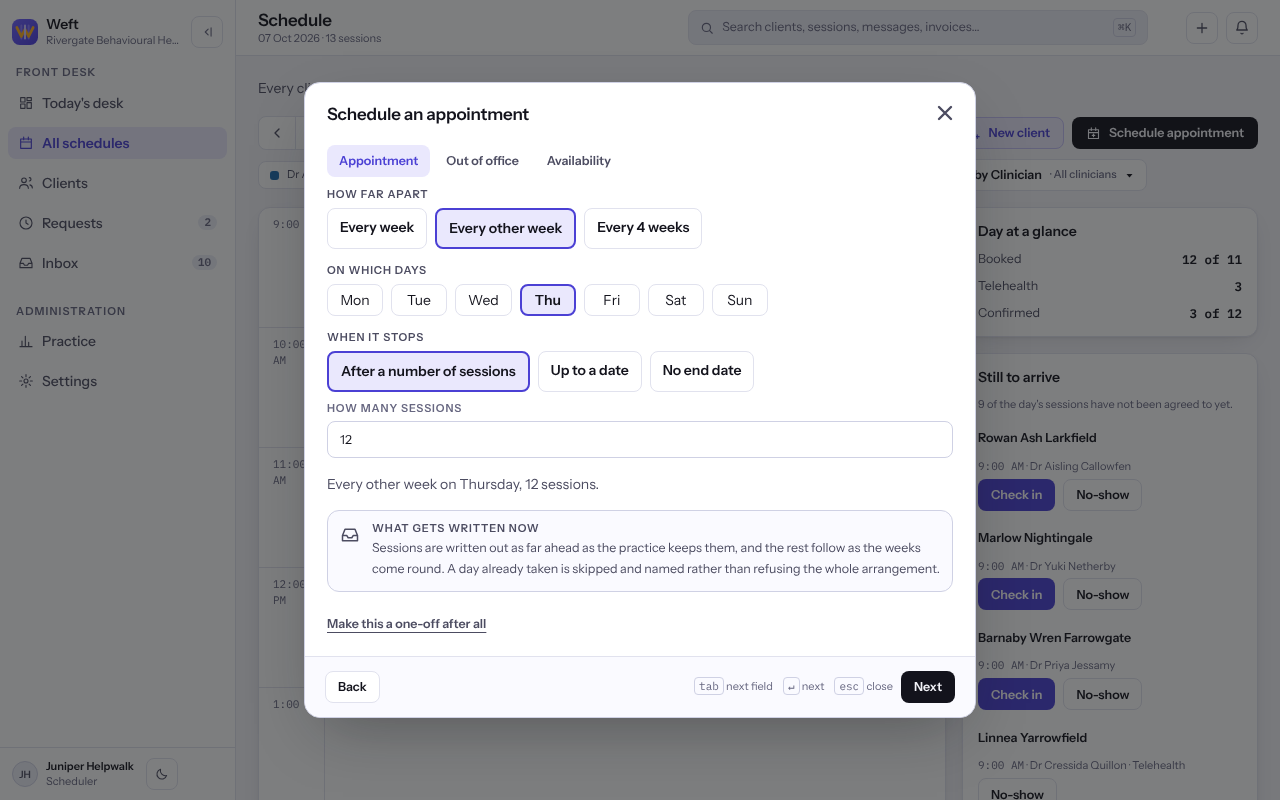
Note: Sessions are written out as far ahead as the practice keeps them, and the rest follow as the dates come into range.
Change or stop the arrangement
- Open any session in the run and select Open the arrangement.
- To change it, select Change the pattern, make the change and select Save the pattern.
- To end it, select Stop this arrangement, then Stop it. Sessions that have already happened stay exactly as they were.
Tip: To move or cancel one session without touching the rest, change it from that session. See Moving or cancelling a session.
Last checked against Weft on 07 Oct 2026. Something on your screen reads differently? Tell us at support@weftary.com.