
Setting working hours
Add the hours a clinician can be booked into, change one date, and block time out.
Who this is for: Clinician, Associate clinician, Scheduler, Practice manager, Practice administrator
Working hours are what the practice can book into, and nothing outside them is offered. A clinician sets their own. A scheduler, a practice manager or the practice administrator can set anybody's. They sit inside the hours the practice keeps, which are set under Setting practice hours, cancellation notice and check-in rules.
Add hours
- Select Create in the header, then Add availability. The Add availability sheet opens beside the schedule.
- If you set hours for others, choose the colleague under Team member.
- Choose the days, set From and To, and under Where choose a place or Any place.
- Leave Repeat every week on for hours that come round every week, or turn it off to add them for this week only.
- Select Add the block. Availability added confirms it, and the hours already open are listed above the button.
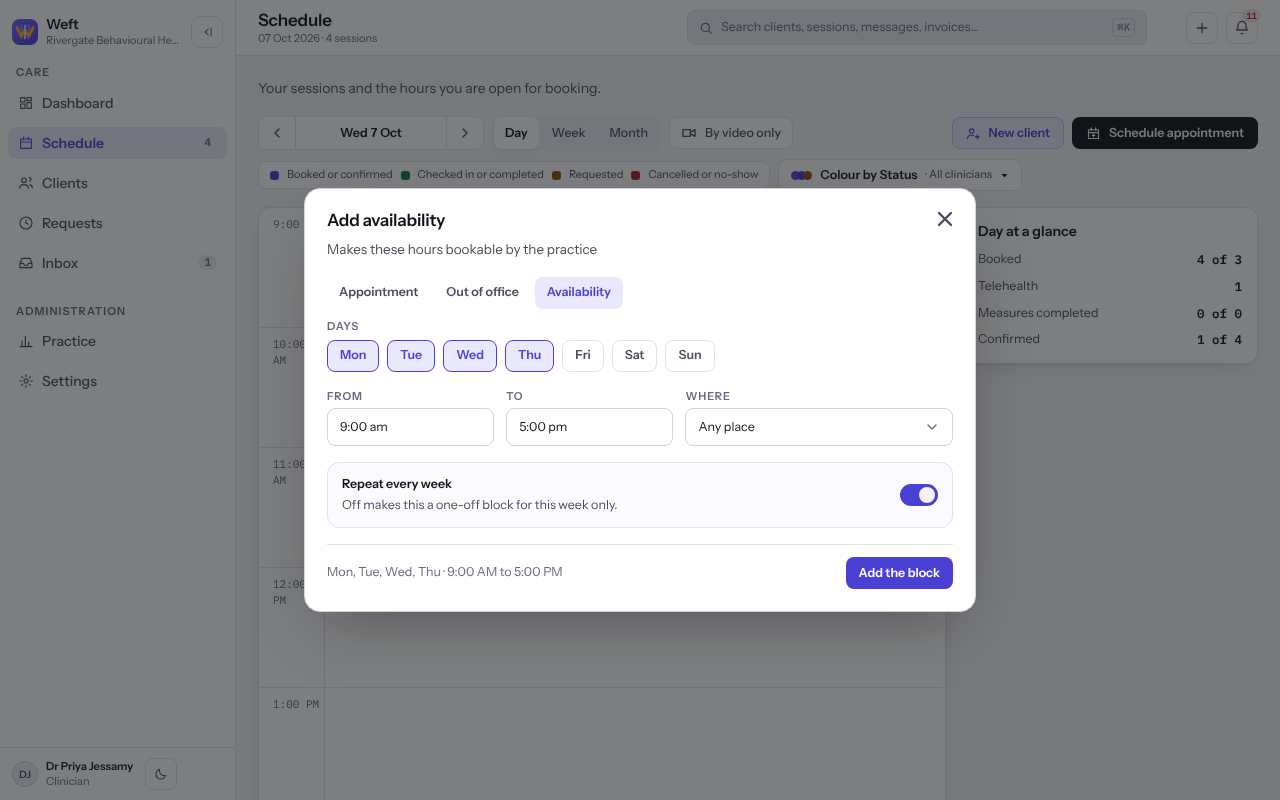
Note: Hours reaching outside the hours the practice keeps are refused, and two windows that meet on one day are refused as one span stated twice.
Change one date in the working hours editor
- In the day view, on a day with nothing booked, select Add availability, or select a block of hours already on the calendar. Working hours opens beside the schedule.
- Under What this is, choose One date only, then enter The date and the hours you will work that day. This replaces the weekly pattern on that date.
- Select Open these hours.
Block time out every week
- In Working hours, under What this is, choose Time blocked out every week.
- Choose the days and the hours.
- Under What it does, choose Take the time out of the schedule, or Leave the time bookable to mark it as spoken for without taking it away.
- Select Block this time out.
Last checked against Weft on 07 Oct 2026. Something on your screen reads differently? Tell us at support@weftary.com.
Common questions
Why does somebody's schedule offer no times?
No hours are open for them, or every open hour is booked. Working hours shows No hours set when nothing is open.