
Booking a session
Book a client into a free time, in person or by video, from the schedule or the header.
Who this is for: Clinician, Associate clinician, Scheduler, Practice manager, Practice administrator
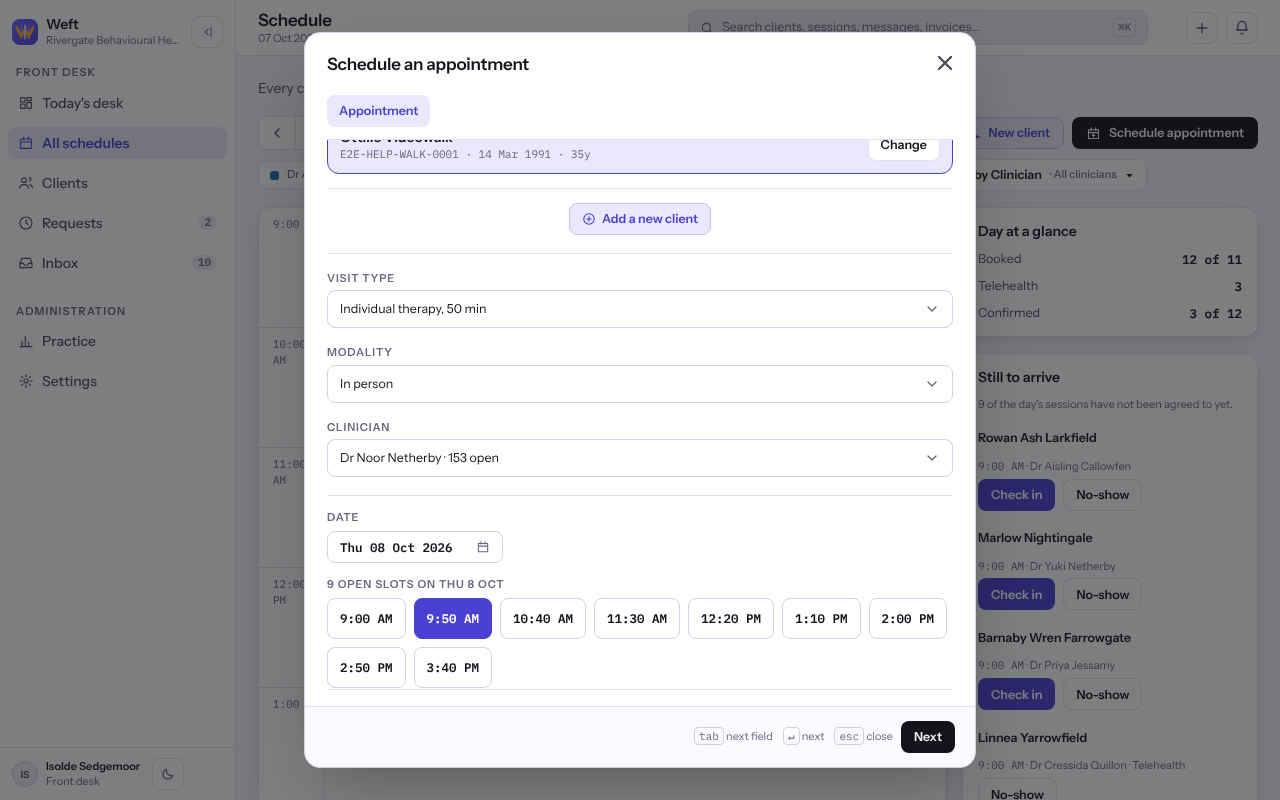
Choose the client, the visit and a time
- On Schedule, select Schedule appointment. You can also select Create in the header, then Schedule an appointment, or press an empty half hour on the calendar.
- Under Search existing clients, type a name, date of birth or record number and choose the client. Somebody new? Select Add a new client.
- Choose the Visit type, then under Modality choose in person at one of your places or by video.
- Where more than one calendar can be booked, choose whose under Clinician, or Anyone to see every open time.
- Pick a Date, then one of the Open slots.
- Under Once, or a run, leave Just this once chosen, and select Next.
Note: By video is offered only for a visit type the practice has marked as one that can be seen by video. See Adding a visit type.
Check it and book
- Read the summary: Client, Visit, When, Clinician and Repeats.
- Optionally add a Note for the practice. Colleagues see it on the appointment and the client never does.
- Select Schedule appointment. Booked confirms it, with Open the chart and Back to the schedule.
Note: If somebody else took the time while you were booking, or the client or clinician is already booked then, Weft says so and offers fresh times. Nothing is booked twice.
Last checked against Weft on 07 Oct 2026. Something on your screen reads differently? Tell us at support@weftary.com.