
Adding a visit type
Say what your practice offers, how long it runs, what it costs, whether it can be seen by video, and which note template it starts from.
Who this is for: Practice administrator, Practice manager, Biller
Visit types are what the booking flow offers, and nothing else. Nothing can be booked until there is at least one.
Add a visit type
- Select Settings, then Visit types, then New visit type.
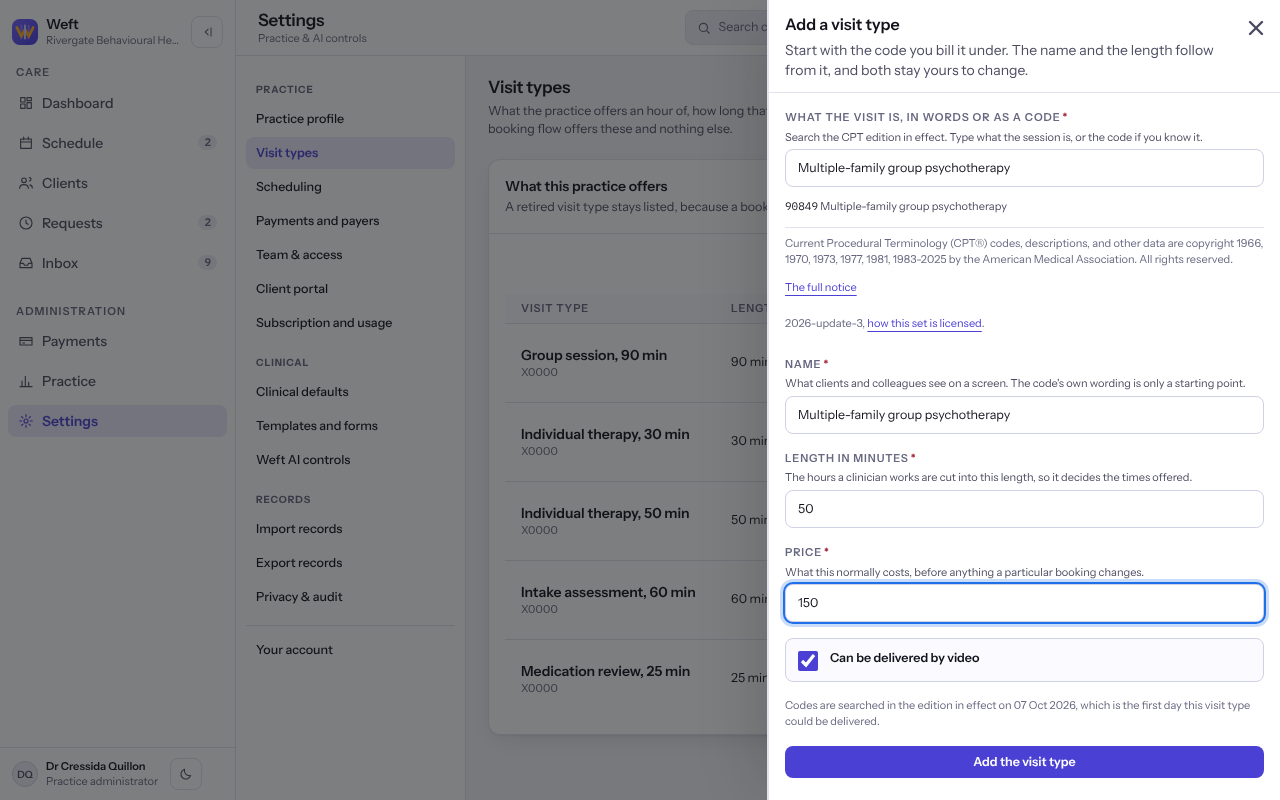
- Under What the visit is, in words or as a code, search the CPT edition in effect, for example by typing psychotherapy, and choose the code.
- Check the Name, which is what clients and colleagues see, and the Length in minutes, which decides the times offered.
- Enter the Price and turn on Can be delivered by video if it can be.
- Select Add the visit type.
Note: A visit type is never deleted, because invoices already raised still name it. One no longer offered is marked Retired.
Tip: No code fits? Enter your practice's own code and say what it means. It is recorded as your own and not as CPT.
Choose the note template it starts from
- Beside the visit type, select Set a note template, or Change the note template.
- Choose the Note template, or No default: the clinician picks one each time, and select Save the note template.
Last checked against Weft on 07 Oct 2026. Something on your screen reads differently? Tell us at support@weftary.com.