
Updating your practice profile and places
Change the practice's time zone and telephone number, record its billing address, add the places you see clients, and upload your logo.
Who this is for: Practice administrator, Practice manager
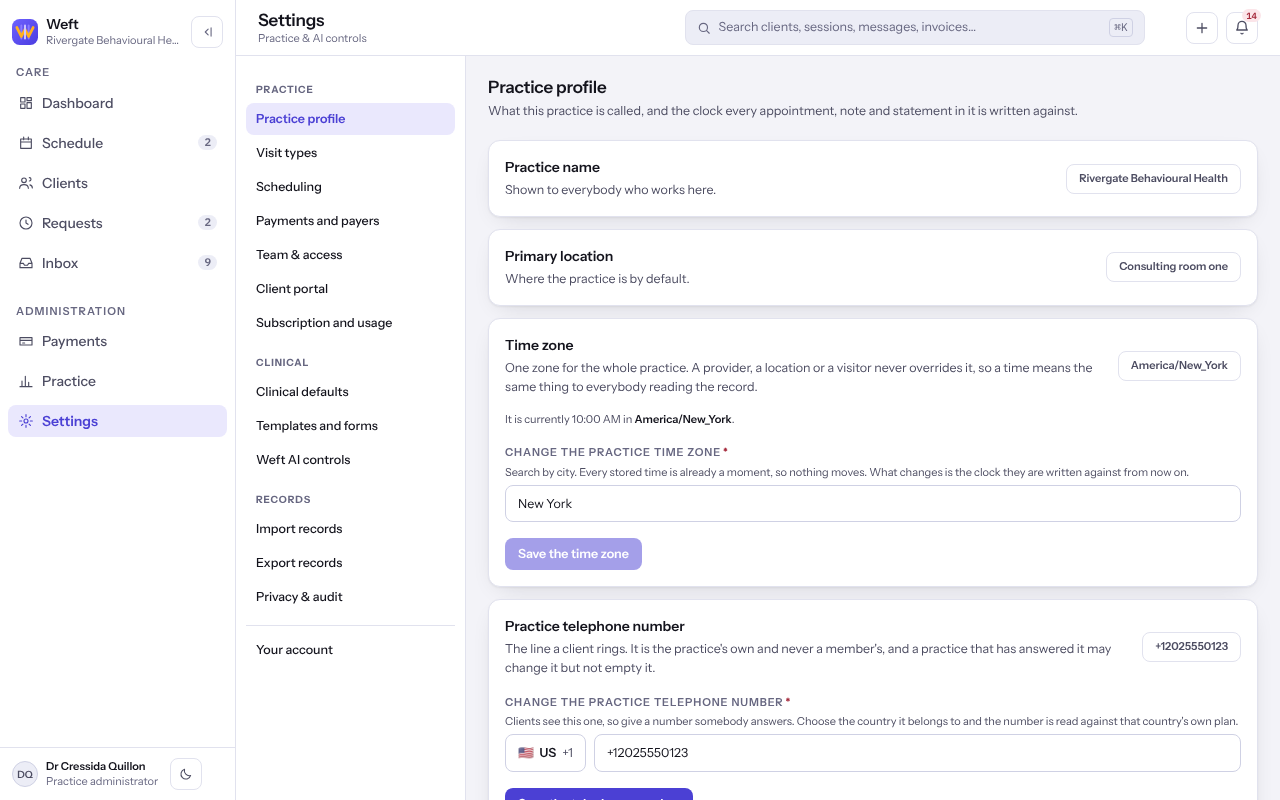
Time zone and telephone
- Select Settings, then Practice profile.
- To move the practice's clock, select Change the practice time zone, search by city, and under What the hours already stated should mean choose Keep the same clock times or Keep the same moments, and move the clock times. Select Save the time zone.
- To change the line clients ring, select Change the practice telephone number and Save the telephone number.
- Turn Accept new clients on or off.
Note: The practice name is set at sign-up and is not changed here. Contact support if it was registered wrongly.
Billing address and identifiers
Statements and superbills state the name, address and identifiers in force on the day of the session, so a change starts a new period rather than rewriting the old one.
- Under Billing identity, select Record a change.
- Fill in the Name the practice bills under, the address, the Provider number and Tax identifier where you have them, and Applies from.
- Select Save the practice details. Who it has been lists every earlier period.
Places you see clients
- Under Locations, select Add a place, give the Name of the place, choose the Location type, and select Add the place.
- Select Make the main place on the place most sessions are booked into.
- A place you no longer use is retired rather than deleted, because past sessions still name it.
Your logo
- Under Your logo, select Choose a file, or drag one here and pick an image. Sending another one replaces it, and Remove it takes it away.
Last checked against Weft on 07 Oct 2026. Something on your screen reads differently? Tell us at support@weftary.com.