
Recording a client's consent to disclose
Record what a client has agreed may leave the practice, amend or withdraw it, and record a request to keep something from their health plan.
Who this is for: Clinician, Scheduler, Practice manager, Practice administrator
Record a consent
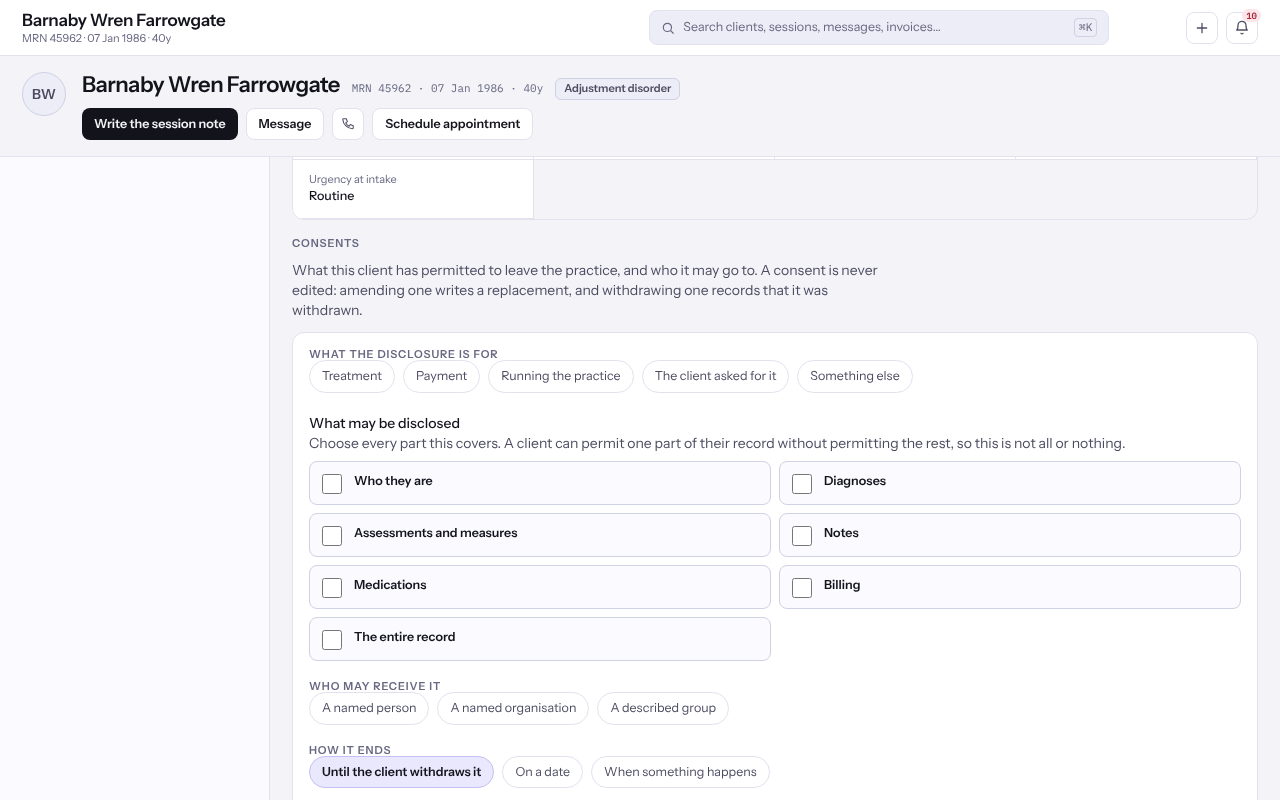
- Open the client. On Overview, find Consents.
- Select Record a consent.
- Under What it is for, choose the purpose, for example Treatment or Payment.
- Under What may be disclosed, tick every part of the record it covers.
- Under Who may receive it, choose a named person, a named organisation or a described group, and name them.
- Under How it ends, choose Until the client withdraws it, On a date or When something happens, and give the First day it covers anything.
- Under How the client gave it, choose In writing, Signed electronically or Spoken, with a witness, then select Record it.
Amend or withdraw a consent
- To change one, select Amend it, change the form and select Replace it. The earlier version stays on the list, marked replaced.
- To record that the client took it back, select Withdraw it, read Withdraw this consent? and select Withdraw it again.
Note: A withdrawal is dated today and cannot be undone. If the client agrees again, record a fresh consent.
Record a request to keep something from their health plan
Where a client has paid in full for a session or an invoice and asks that it not be sent to their health plan, record it under Disclosure restrictions, inside Consents.
- Select Record a restriction.
- Under Disclosure restriction, choose the session or invoice the client asked about.
- Enter The day the client asked and tick The client has paid for this in full.
- Add a Note if it helps colleagues, then select Record the request.
- If the client later asks you to lift it, select Lift this request.
Last checked against Weft on 07 Oct 2026. Something on your screen reads differently? Tell us at support@weftary.com.