
Giving a client access to the client portal
Open a portal login for a client, a parent or guardian of a minor, or a court-appointed guardian, and end it when it should stop.
Who this is for: Scheduler, Clinician, Practice manager, Practice administrator
A login lets the person read what your practice offers in the portal, message the practice and ask for a session. Whoever is granted access is emailed a link to set their password.
Grant access
- Open the client and select Client portal in the chart's rail.
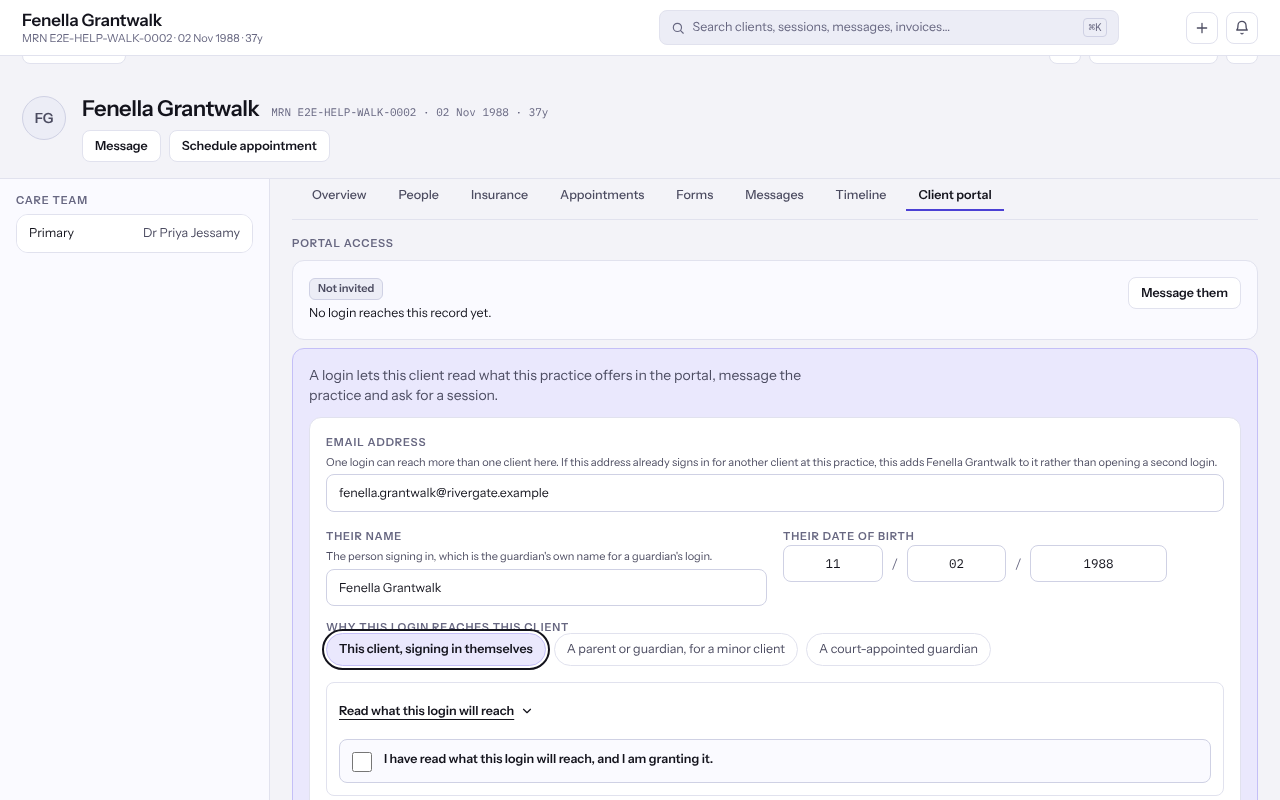
- Under Portal access, fill in the form. If somebody already has a login, select Open another login for this client first.
- Enter the Email address the person will sign in with, Their name and Their date of birth. For a guardian, these are the guardian's own details.
- Under Why this login reaches this client, choose This client, signing in themselves, A parent or guardian, for a minor client or A court-appointed guardian.
- Open Read what this login will reach, then tick the box agreeing to it.
- Select Grant portal access and confirm it is you.
Tip: If the address already signs in for another client at your practice, the same login reaches this client too. A parent with two children needs only one login.
Choose what this client's portal offers
Under Portal permissions, each part of the portal, such as Appointments, Messages or Bills and payments, says whether this login Reaches it or Does not reach it.
- Use the switch on a part to turn it off or on for this login.
- A part your practice has off for every client shows no switch here. Whoever manages the portal turns it on under Settings, then Client portal.
End access
- Find the login under Portal access and select End access.
- Read End portal access? and select End access again.
Note: Ending access does not delete the client's record or any messages already exchanged. If the login reaches no other client, it is signed out straight away.
Last checked against Weft on 07 Oct 2026. Something on your screen reads differently? Tell us at support@weftary.com.
Common questions
The client says they never received the email.
If Offered, never used shows against the login, read the address back to them. Opening a login again replaces the old link, which then stops working.
Can an adult the client has chosen be given access?
Not today. A login can be granted to the client, a parent or guardian of a minor, or a court-appointed guardian.