
Seeing your appointments and asking for one
See what is booked, ask your practice for an appointment, and cancel one where your practice allows it.
Who this is for: Client
See what is booked
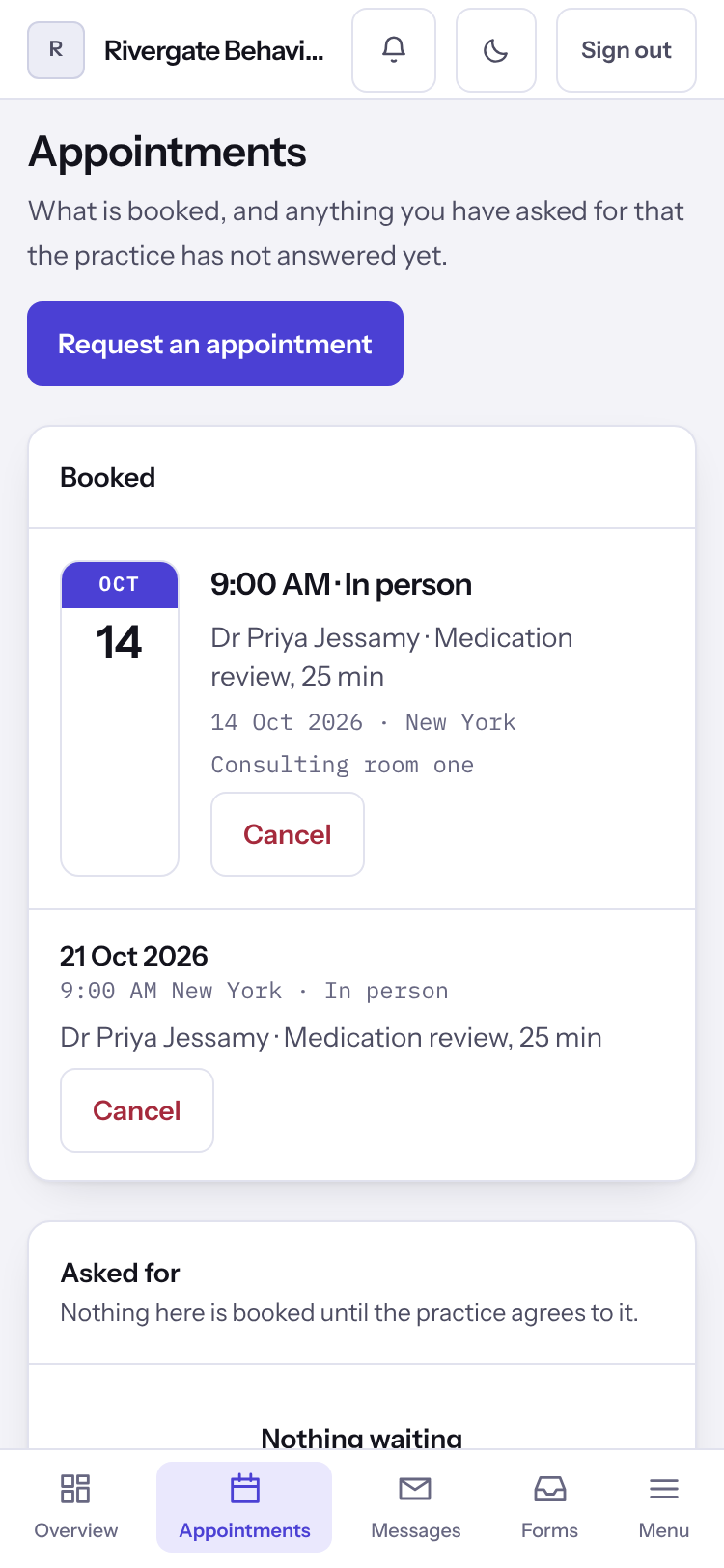
- Select Appointments. Booked lists the sessions coming up, or says Nothing booked. Asked for lists what you have asked for that the practice has not answered yet, or says Nothing waiting. Already happened appears once you have had a session here.
Ask for an appointment
- Select Request an appointment.
- Under What is this about?, say enough for the practice to know what to book.
- Choose How would you rather be seen?, and under When suits you? choose Times of day and Days, or leave them empty.
- Select Send your request. Your request is with the practice confirms it, and their answer appears on Appointments.
Note: A request is not a booking. A time is yours once the practice agrees to it and it appears under Booked.
Cancel an appointment
Where your practice allows it, an appointment far enough ahead shows Cancel.
- Select Cancel on the appointment, then Yes, cancel it. To keep it, select Keep it.
- Closer to the appointment than your practice allows, the control is not shown. Message or call the practice instead.
Last checked against Weft on 07 Oct 2026. Something on your screen reads differently? Tell us at support@weftary.com.