
Accepting an invitation to a practice
Join a practice from the invitation email, set your password and set up your second step.
Who this is for: Everyone at the practice
Join the practice
- Open the invitation email and follow the link.
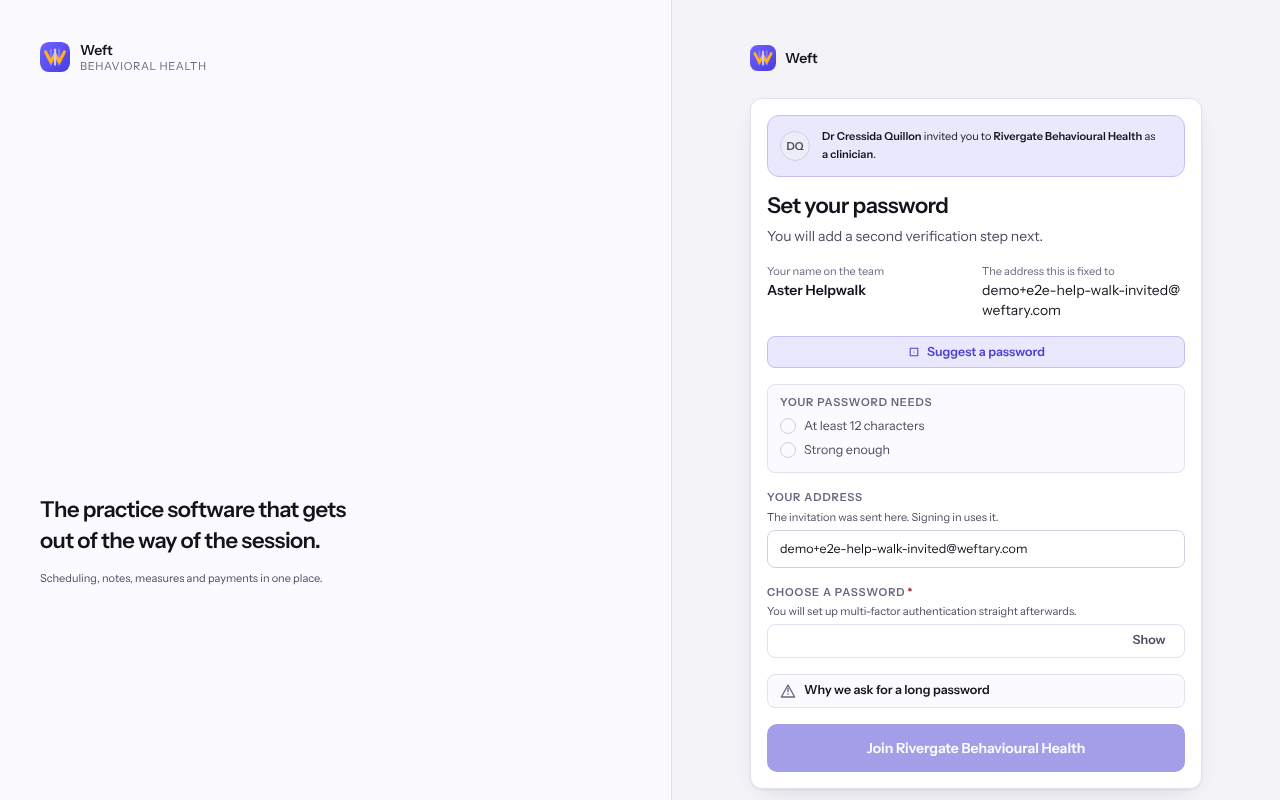
- Check Your name on the team and The address this is fixed to. If either is wrong, ask the practice for a new invitation.
- Type a password under Choose a password and select Join followed by the practice's name.
- Set up your second step when Weft asks. See Setting up multi-factor authentication.
Note: Already signing in to Weft for another practice with this address? Select Sign in, then come back here, then join. You keep one password for both.
Important: If Someone else is signed in here appears, the browser is signed in as a different person. Select Sign them out and carry on only on your own computer.
Last checked against Weft on 07 Oct 2026. Something on your screen reads differently? Tell us at support@weftary.com.
Common questions
The invitation says it cannot be used.
It has expired or been withdrawn. Ask whoever invited you to send a new one. An invitation is fixed to one address and cannot be moved to another.