
Setting up your practice
Create a practice on Weft, confirm your email address, and sign in once the practice is approved.
Who this is for: Practice administrator
Setting up a practice makes you its first member, with the practice administrator role. It takes three parts: the sign-up form, a confirmation email, and a review on our side before anybody reaches the practice's records.
Fill in the sign-up form
- Go to app.weftary.com/sign-up. From the sign-in screen, select Set it up beside New practice?
- Enter the Practice name, Your first name, Your last name and the Email address you will sign in with.
- Under Practice time zone, search by city and choose the clock your sessions and notes are written against.
- Type a password under Choose a password. The list under Your password needs ticks off each requirement as you type.
- Tick the box accepting the agreements. Each agreement named in the sentence opens in a new tab if you want to read it first.
- Select Set up your practice. The screen changes to Check your email.
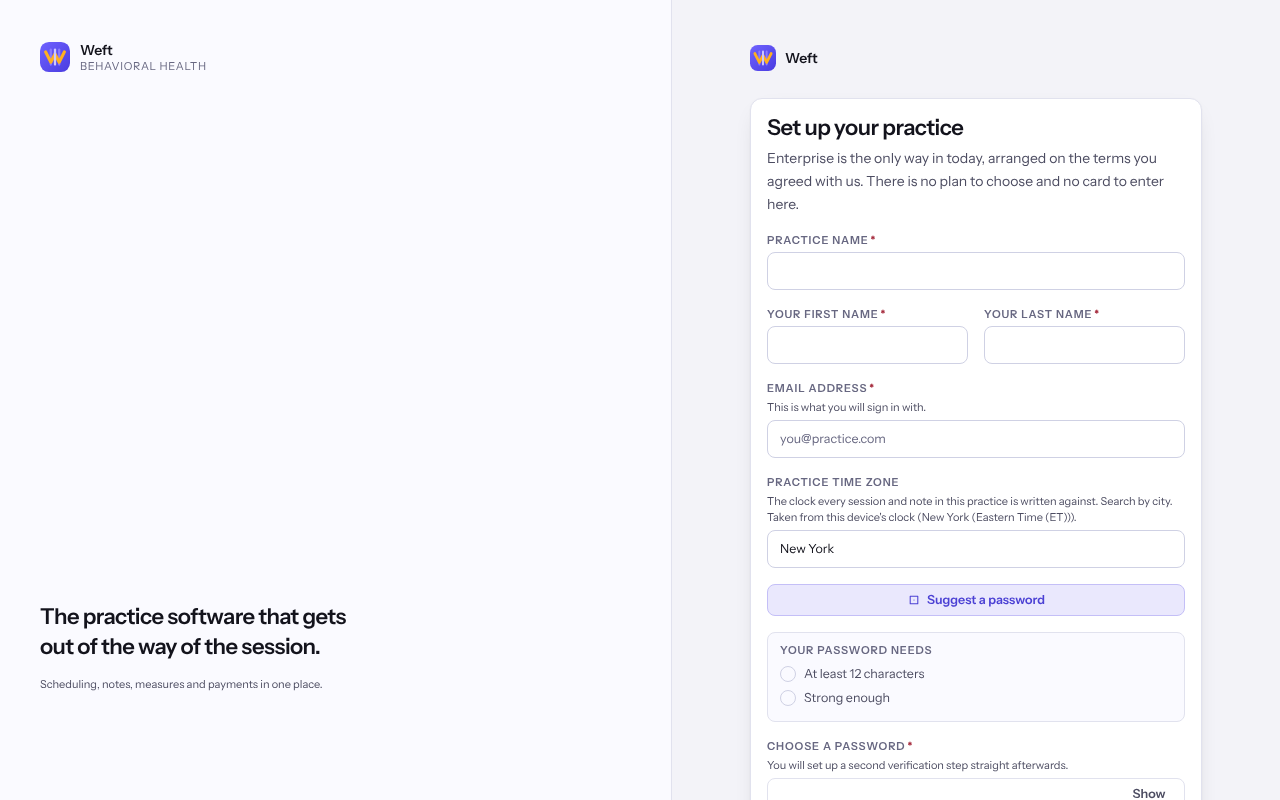
Note: Set up your practice stays unavailable until the password meets every requirement and the agreements are accepted.
Confirm your email address
- Open the email we sent and follow the link, on this device or another one.
- On Confirm your password, enter the password you chose at sign-up and select Confirm this address.
- When Your email address is confirmed appears, select Go to signing in.
Sign in once the practice is approved
- Sign in with your email address and password. Until the practice is approved, Weft shows where the practice stands instead of its screens, with Sign out and Contact support.
- We email you when the practice opens. Sign in again and follow Set up your multi-factor authentication, described in Setting up multi-factor authentication.
Tip: Invite your colleagues once you are in, from Settings, then Team & access. See Inviting a colleague.
Last checked against Weft on 07 Oct 2026. Something on your screen reads differently? Tell us at support@weftary.com.
Common questions
The confirmation email has not arrived. What should I do?
Check your spam folder first. The sign-up form never says whether an address is already in use, so if you signed up before with the same address, try signing in or resetting your password.
Is there a plan to choose or a card to enter?
No. The sign-up form takes no payment details. The terms your practice is on are shown under Settings, then Subscription and usage.