
Find unbilled appointments on the Work tab
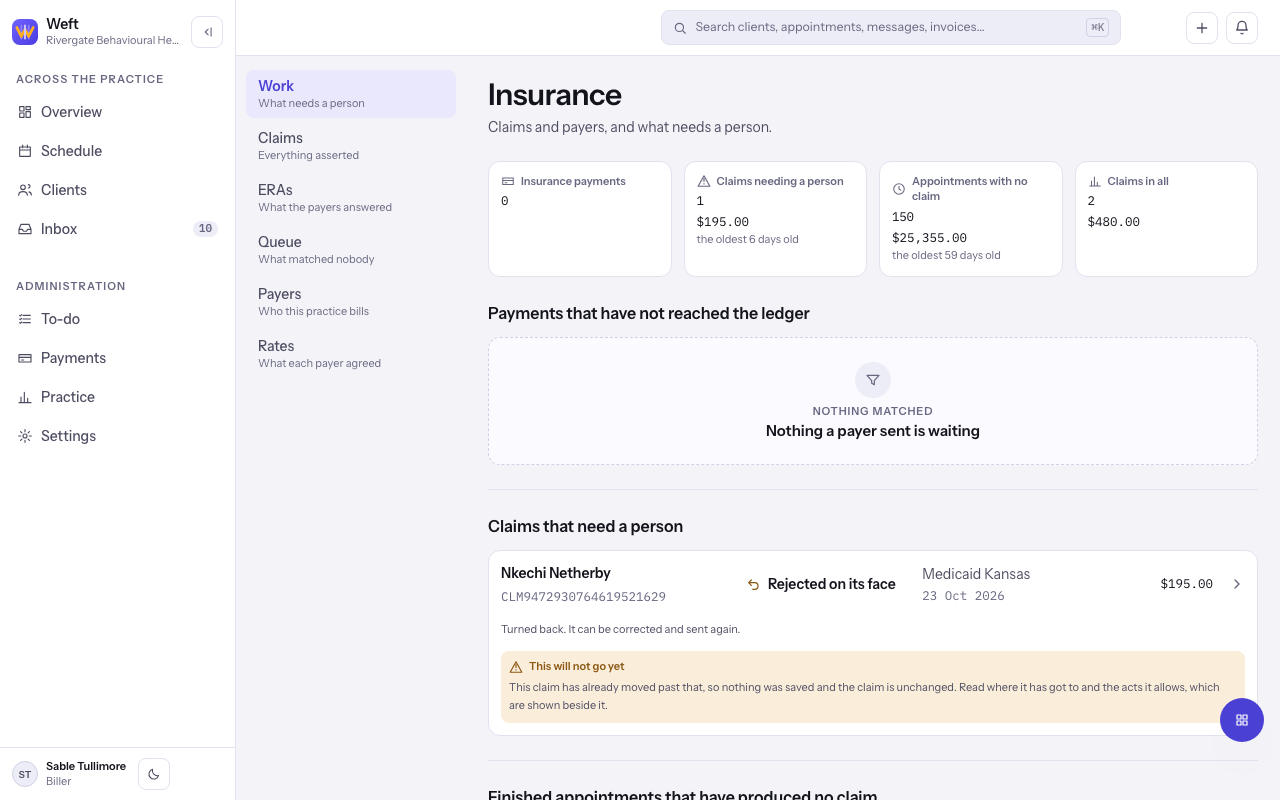
Use the Work tab to see finished appointments that have no claim, claims waiting on a person and payments not yet posted.
Who this is for: Biller, Practice manager, Practice administrator
Work is the first tab under Insurance. It lists what needs a person today. This is the fifth stage of insurance from start to finish.
Read the tiles
- Go to Insurance, which opens on Work.
- Read the tiles: Insurance payments, Claims needing a person, Appointments with no claim and Claims in all. Each shows a count, what it comes to and how long the oldest has waited.
- Select a tile to jump to its list.
Note: A count marked with a plus, or a sum prefaced "at least", means the screen did not read everything. The lists below, and the Claims tab, reach the rest.
Work the lists
- Payments that have not reached the ledger lists payer payments waiting to be posted. Open one to post it.
- Claims that need a person lists claims that were rejected, denied or stuck. Open one to fix it.
- Finished appointments that have produced no claim lists each appointment with the client, the provider, the service and the amount. Select Assemble a claim beside one to start the claim.
- If the row shows Record a policy instead, the client has no policy covering that day. Record one first.
Last checked against Weft on 29 Oct 2026. Something on your screen reads differently? Tell us at support@weftary.com.