
Record a client's insurance and card
Write down a client's policy from their card, or record it from what the client told the practice, and correct or end it later.
Who this is for: Biller, Practice manager, Practice administrator
A claim is built from the client's policy, so record it before the first visit is billed. This is the second stage of insurance from start to finish.
Record a policy
- Open the client and select Insurance in the chart's rail.
- Select Record a policy, or Add another for a second one.
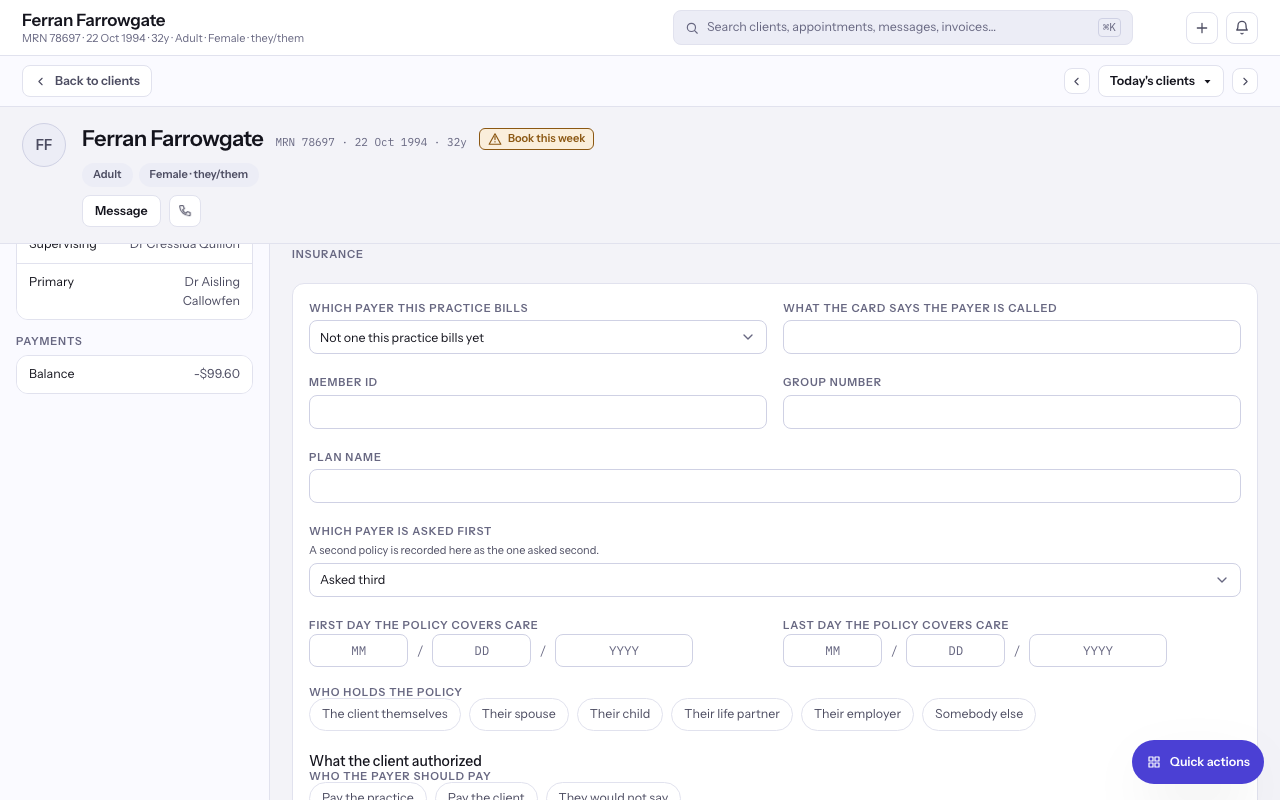
- Choose Which payer this practice bills, and type What the card says the payer is called exactly as the card has it.
- Enter the Member ID, and the Group number and Plan name where the card carries them.
- Choose Which payer is asked first, and give the First day the policy covers care if the card says.
- Under Who holds the policy, choose The client themselves or the holder's relationship, and fill in the holder's details where it is somebody else.
- Answer Who the payer should pay and What the practice holds to release their billing information, then select Record it.
Write down what the client said, with their card
- When a client gives their insurance at the desk or tells you in the client portal, it appears in the chart's Insurance area for you to act on.
- To write it down yourself, select Write down what they said and fill in Who the client says insures them, Member ID, Group number and Plan name.
- Add Front of the card and Back of the card, then select Write it down.
- To turn what they said into a policy, select Record a policy from this. To dismiss it, select Set it aside and give the reason.
Correct or end a policy
- To change a policy, select Correct, change the form and select Correct it. The earlier version stays readable.
- When the practice stops billing through it, select End it, then End it again.
Note: If the payer says a policy ended on a date already past, correct it with that date rather than ending it today.
Last checked against Weft on 29 Oct 2026. Something on your screen reads differently? Tell us at support@weftary.com.