
Bill the client their share
Raise an invoice for the copayment, coinsurance, deductible or other amount the payers left with the client.
Who this is for: Biller, Practice manager, Practice administrator
After the payers have paid, what is left is the client's share. This is the last stage of insurance from start to finish.
See what the client owes
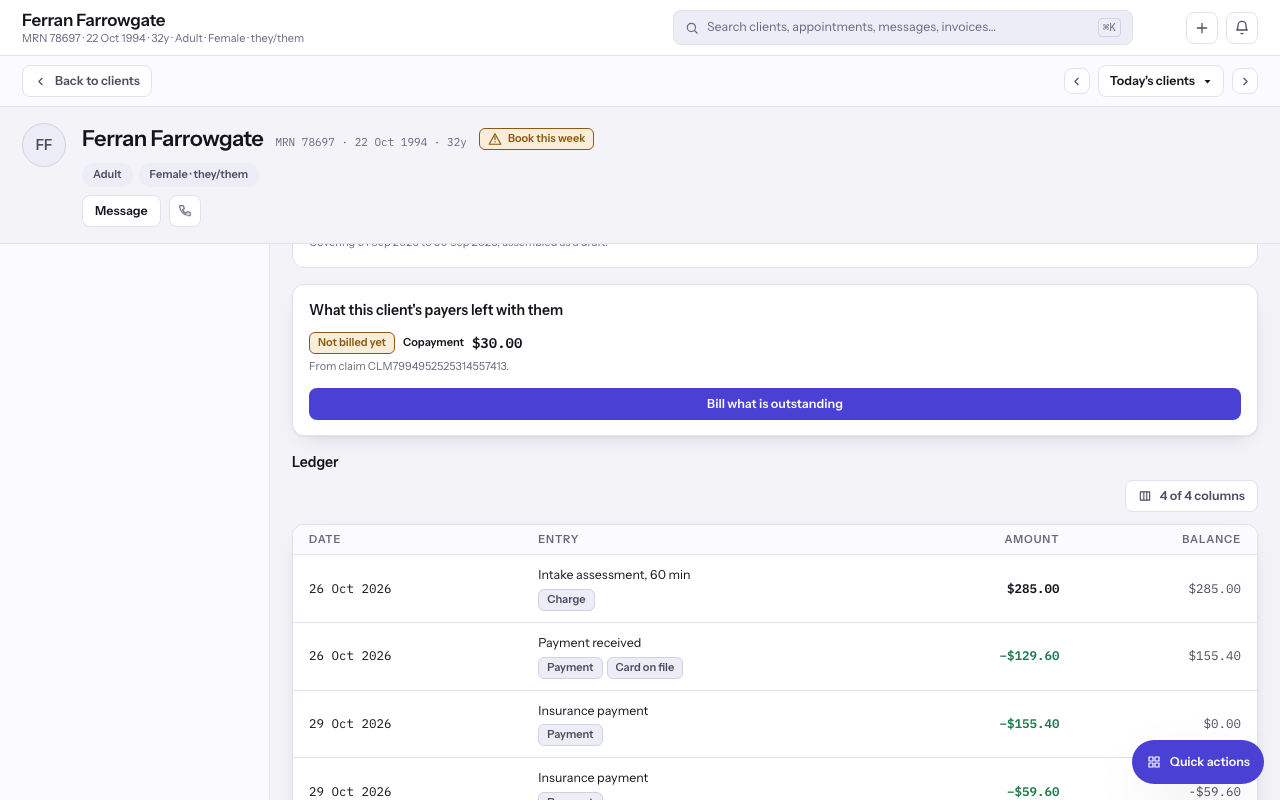
- Open the client and select Payments in the chart's rail. Under What this client's payers left with them, each share shows its kind: Copayment, Coinsurance, Deductible, Not covered or Left with the client.
- Each share is Not billed yet, On an invoice or Replaced by a later answer.
- On an ERA, Client responsibility is the same money, as the payer reported it. The claim shows it as Client responsibility (claim total) and Client responsibility (PR adjustments).
Bill it
- Select Bill this share beside one share, or Bill what is outstanding for all of them. On an ERA, select Bill the client.
- An invoice is raised as a draft. Issue it when you are ready, and see raising an invoice.
- If the client has a card on file and card payments are set up, select Charge the card on file instead.
Tip: Turn on Automatic invoices for the client's share in Settings, under Payments and payers, to raise these as payments are posted.
Last checked against Weft on 29 Oct 2026. Something on your screen reads differently? Tell us at support@weftary.com.