
Recording and posting an insurance payment
Type in a paper explanation of benefits, then post a payer's payment onto your clients' balances.
Who this is for: Biller, Practice manager, Practice administrator
A payer's answer delivered through the clearinghouse appears under Remittances by itself. A paper explanation of benefits is typed in, and both are posted the same way.
Type in a paper explanation of benefits
- Go to Insurance, choose Remittances, then select Record a payment.
- Under The payment, choose the Payer, enter The payer's reference for the payment, the Payment method, The day the money moved and Total paid, in cents.
- Select Add a claim from the paper for each claim it answers, and fill in what was charged, paid and taken off, line by line.
- Select Record the payment.
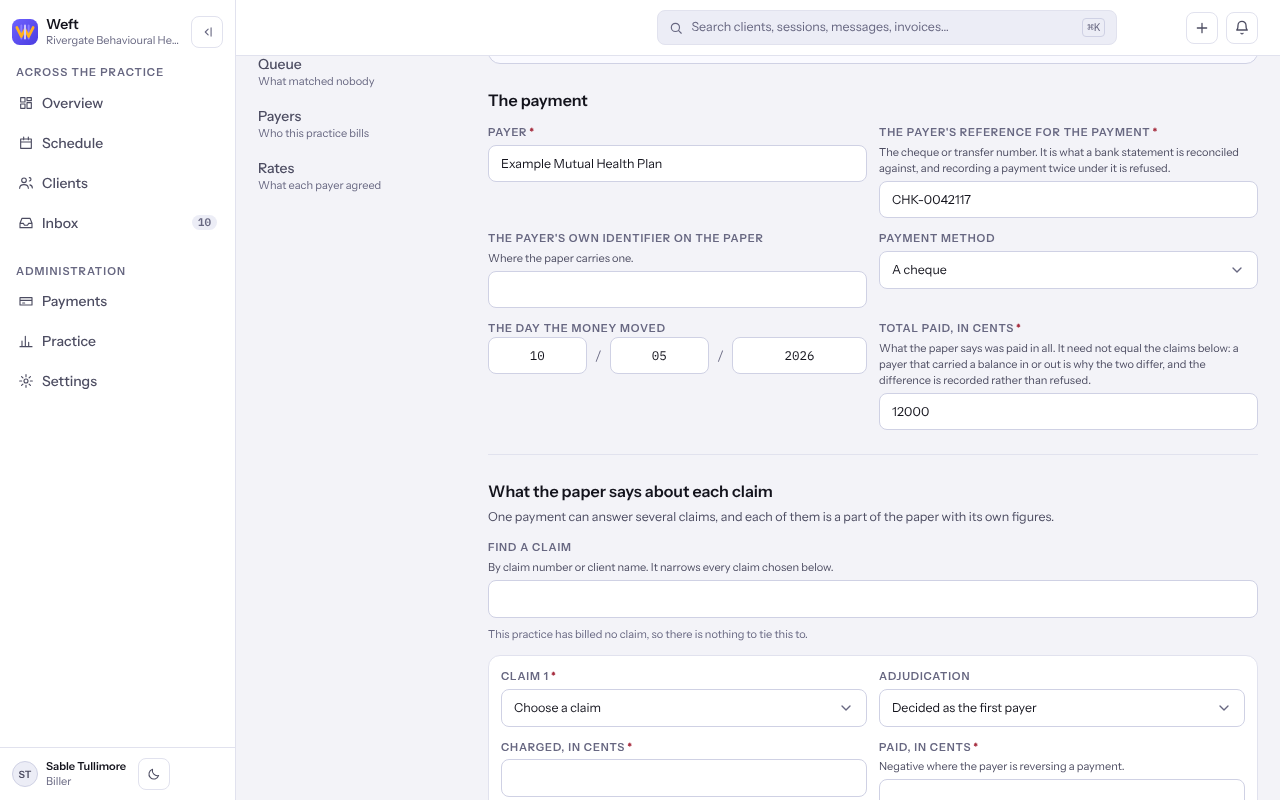
Important: Amounts are in cents, so twelve dollars fifty is 1250.
Post it to the ledger
- Open the remittance and read each claim, service line and adjustment code it names.
- Select Post this to the ledger, then Post it. What the payer paid goes against the claims, and what it left with a client is raised as their share.
- If the money never arrived, select Withdraw this payment, then Withdraw it.
Last checked against Weft on 07 Oct 2026. Something on your screen reads differently? Tell us at support@weftary.com.