
Recording a client's insurance and checking eligibility
Record the policy that pays for a client's care, correct or end it, and ask the payer whether it is in force.
Who this is for: Biller, Practice manager, Practice administrator
Record a policy
- Open the client and select Insurance in the chart's rail.
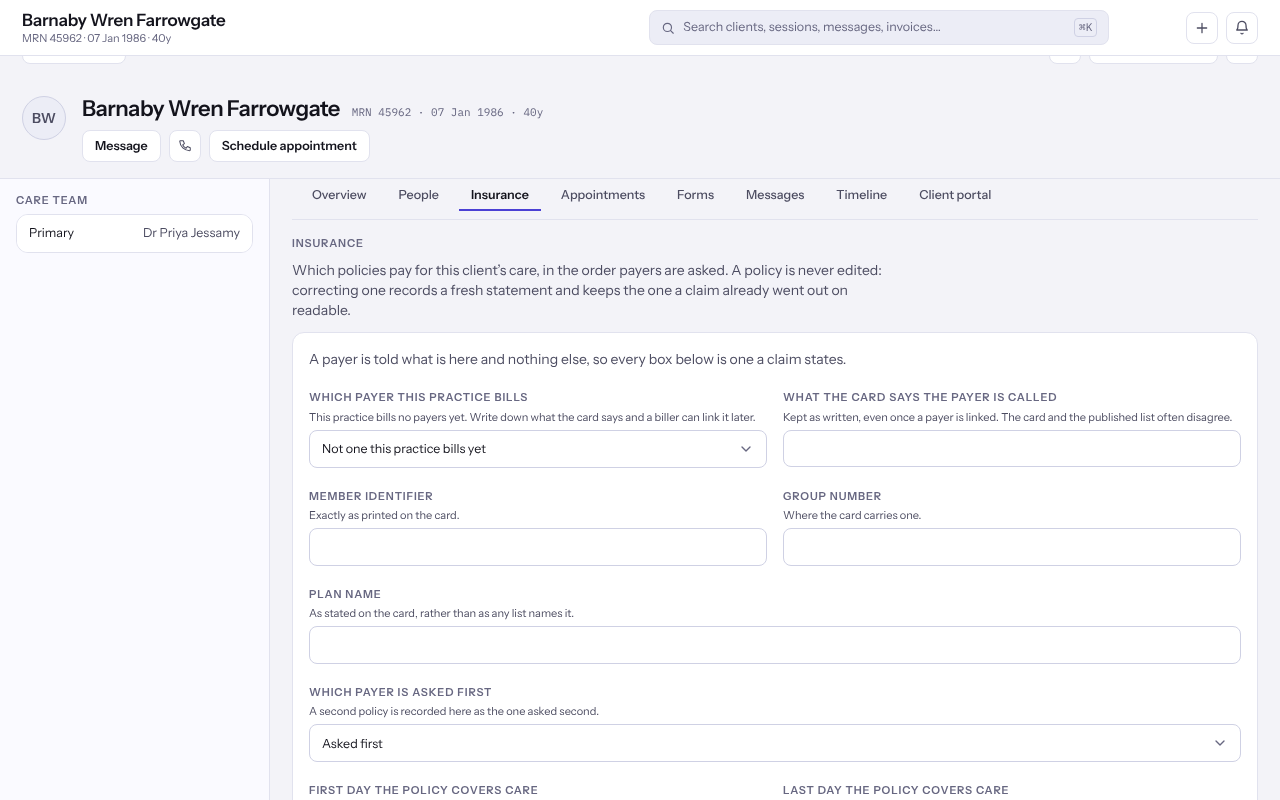
- Select Record a policy, or Add another for a second one.
- Choose Which payer this practice bills, and type What the card says the payer is called exactly as the card has it.
- Enter the Member identifier, and the Group number and Plan name where the card carries them.
- Choose Which payer is asked first, and give the First day the policy covers care if the card says.
- Under Who holds the policy, choose The client themselves or the holder's relationship, and fill in The person holding the policy where it is somebody else.
- Answer What the client authorised, then select Record it.
Correct or end a policy
- To change a policy, select Correct it, change the form and select Correct it again. The earlier version stays readable.
- When the practice stops billing through it, select End it, then End it again.
Note: If the payer says a policy ended on a date already past, correct it with that date rather than ending it today.
Ask the payer whether it is in force
- Beside the policy, select Ask the payer.
- Wait for What the payer says: whether it is In force, and the copay, coinsurance and deductible left, kind by kind.
Note: Each question costs the practice money, so the same question waits a few minutes before it can be asked again.
Last checked against Weft on 07 Oct 2026. Something on your screen reads differently? Tell us at support@weftary.com.