
Fix a rejected or denied claim
Read why a claim came back, correct it and send it again, replace or cancel it, or write off what is left.
Who this is for: Biller, Practice manager, Practice administrator
A claim can come back before the payer decides it, or be decided and not paid. This is the eighth stage of insurance from start to finish.
Read why it came back
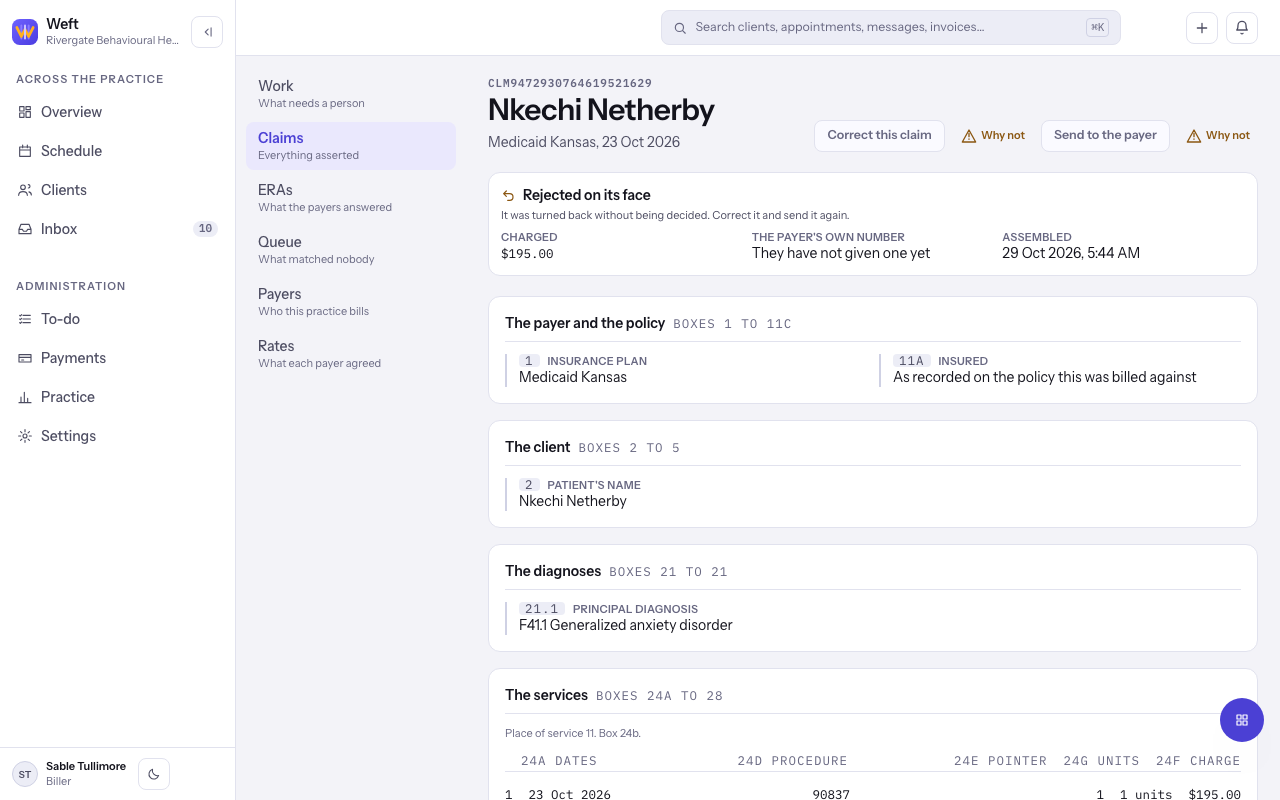
- Open the claim from Claims that need a person on the Work tab, or from Claims.
- Rejected on its face means it was turned back without being decided. Denied means the payer decided not to pay. Needs correction means something has to change first.
- Read What came back. It gives the payer's reason in their own words.
Correct and send it again
- For a claim rejected on its face, select Correct this claim, fix what the reason names and select Save and check again.
- Select Send to the payer, then Send it.
- For a claim already decided, select Replace this claim, then Build the replacement. It is a draft until you send it.
- To tell the payer to disregard a claim, select Cancel this claim with the payer, then Build the cancellation.
When the payer will not pay
- If the wrong payer was billed, select Bill a different payer, choose the policy under Which policy to bill and select Build the claim.
- If the money cannot be recovered, select Write off what is left, give the amount and a reason. Select Keep chasing it to leave it open.
Tip: Select Run the checks at any time to see what is stopping a draft.
Last checked against Weft on 29 Oct 2026. Something on your screen reads differently? Tell us at support@weftary.com.