
Record contracted rates
Put each payer's agreed amounts on file by hand or by uploading a spreadsheet, and correct a rate that changed.
Who this is for: Biller, Practice manager, Practice administrator
A contracted rate is what a payer agreed to allow for a service. Rates let the practice compare what a payer paid with what it agreed to. This is the fourth stage of insurance from start to finish.
Record a rate
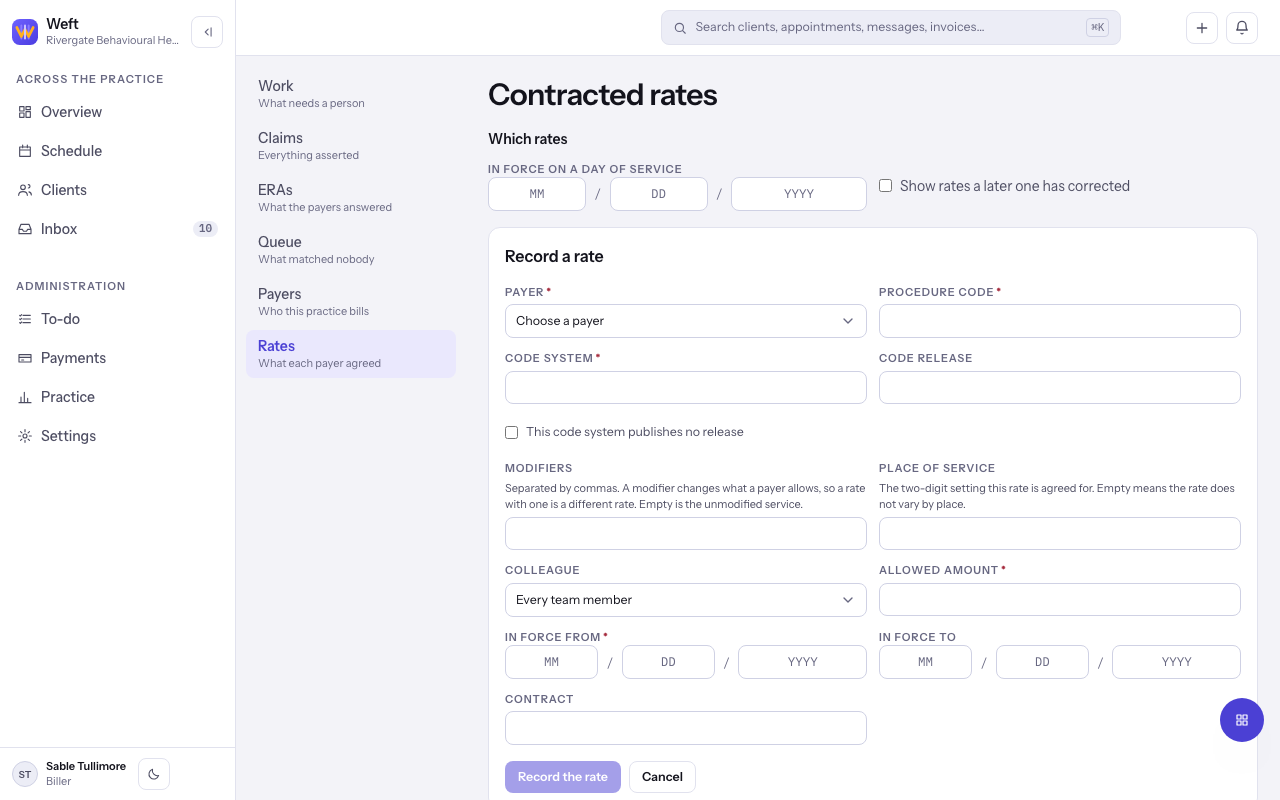
- Go to Insurance, choose Rates, then select Record a rate.
- Choose the Payer, enter the Procedure code, and set the Code system and Code release.
- Add Modifiers and Place of service only where the rate depends on them.
- Enter the Allowed amount in dollars and cents, and In force from (and In force to if it ends), then select Record the rate.
Upload many at once
- Select Upload rates spreadsheet and Choose the sheet.
- Under Match the columns, match each heading in the sheet to a field, and say How dates are written on this sheet.
- Select Send with the row count, then Bring these rows in once you have read What was read.
Correct a rate
- Beside the rate, select Record a correction and change what is wrong, then select Record the correction.
- The old rate stays on file, marked Corrected by a later rate. To see it, turn on Show rates a later one has corrected.
Last checked against Weft on 29 Oct 2026. Something on your screen reads differently? Tell us at support@weftary.com.